
Node power
Read a node's power state and power it on, shut it down, or restart it through its out-of-band management controller.
Required role: Administrator
Power actions need the Administrator role. Users can check power state but get
403 Forbiddenwhen they try a power action.
Power actions
resetType |
Effect |
|---|---|
On |
Powers the node on. |
GracefulShutdown |
Asks the operating system to shut down, then leaves the node off. |
ForceOff |
Cuts power immediately and leaves the node off. Unsaved data is lost. |
ForceRestart |
Reboots immediately. Running processes are killed. |
Which actions are valid depends on the node's current power state. For example, you can't power on a node that is already on. Invalid transitions return 409 Conflict.
Before a disruptive action
Before you shut down or restart a node, check that it is safe to do so:
curl "$API_URL/v1/fleets/$FLEET_ID/nodes/$NODE_ID/details" -H "Authorization: Bearer $TOKEN" \
  | jq '.powerActionReadiness'
If ready is false, follow blockerMessage first. For a Kubernetes worker, that usually means cordoning and draining the node. See Power action readiness.
Run a power action
Console
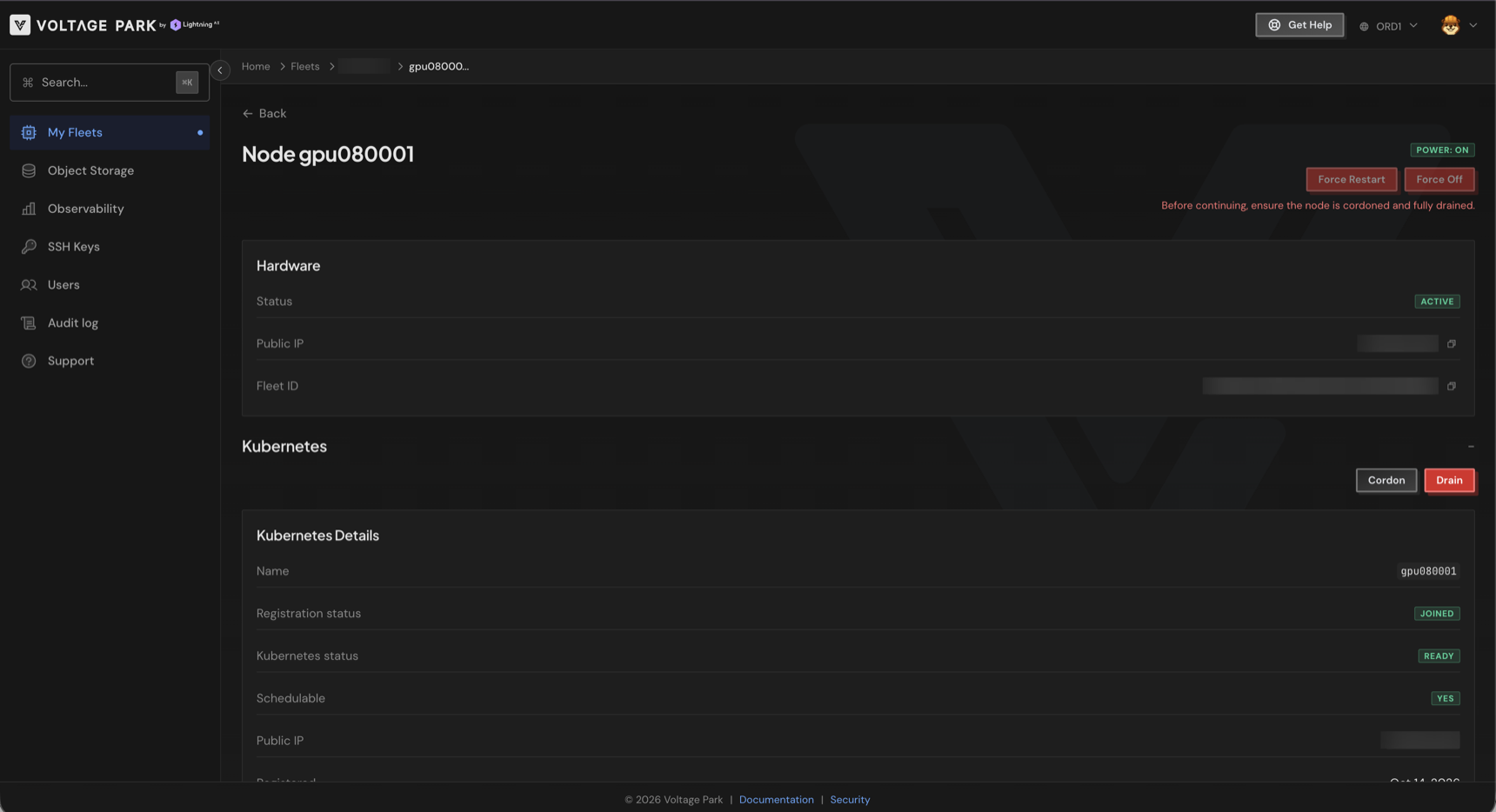
Open the node's detail page from the fleet's Nodes tab. The current power state and the power buttons are at the top right. When a disruptive action isn't safe yet, the readiness message appears under the buttons. In this example the node is on, so Force Restart and Force Off are offered, and the message asks for the node to be cordoned and drained first.
API
curl -X POST "$API_URL/v1/fleets/$FLEET_ID/nodes/$NODE_ID/power" \
  -H "Authorization: Bearer $TOKEN" \
  -H "Content-Type: application/json" \
  -H "Idempotency-Key: $(uuidgen)" \
  -d '{"resetType": "ForceRestart"}'
Response (202 Accepted):
{
  "nodeId": "g1234",
  "resetType": "ForceRestart",
  "powerStateBefore": "On",
  "status": "queued",
  "operationId": "..."
}| Status | Meaning |
|---|---|
202 |
The operation was accepted and queued. |
200 |
The operation had already completed. The body has its outcome. |
409 |
The transition conflicts with the current power state, or a request with the same key is still in progress. |
423 |
Another power operation is already running on this node. Wait for it to finish. |
502 |
The node's management controller is unreachable or returned an error. |
503 |
The operation was recorded but rejected immediately. Retry with a new Idempotency-Key. |
Retrying with the same Idempotency-Key returns the first response again, usually 202, even after the operation finishes. Don't retry to learn the outcome: check the power state instead.
Check power state and operation progress
Console
The node's detail page shows the current power state and the most recent operation.
API
curl "$API_URL/v1/fleets/$FLEET_ID/nodes/$NODE_ID/power" -H "Authorization: Bearer $TOKEN"{
"nodeId": "g1234",
"powerState": "On",
"lastOperation": {
"operationId": "...",
"resetType": "ForceRestart",
"status": "IN_PROGRESS",
"queuedAt": 1755831319000,
"completedAt": null
}
}lastOperation.status moves through ACCEPTED → IN_PROGRESS → SUCCESS, FAILURE, or TIMED_OUT. On failure, lastOperation.error includes a code, a message, and resetIssued (yes, no, or unknown), which tells you whether the command actually reached the hardware.
The power state is eventually consistent
powerStateis the last confirmed value, not a live hardware read:
- It can show the previous state while an operation is in progress.
- A power change made outside this API can take up to 5 minutes to appear.
- While an operation is
ACCEPTEDorIN_PROGRESS, poll every 10–15 seconds and honor theRetry-Afterheader.
Was this page helpful?
Thanks for the feedback.