
Batch jobs
Lightning Batch Jobs run large-scale simulations, sweeps, and workflows in parallel on dedicated machines.
Submit jobs via the web app, or via the SDK:
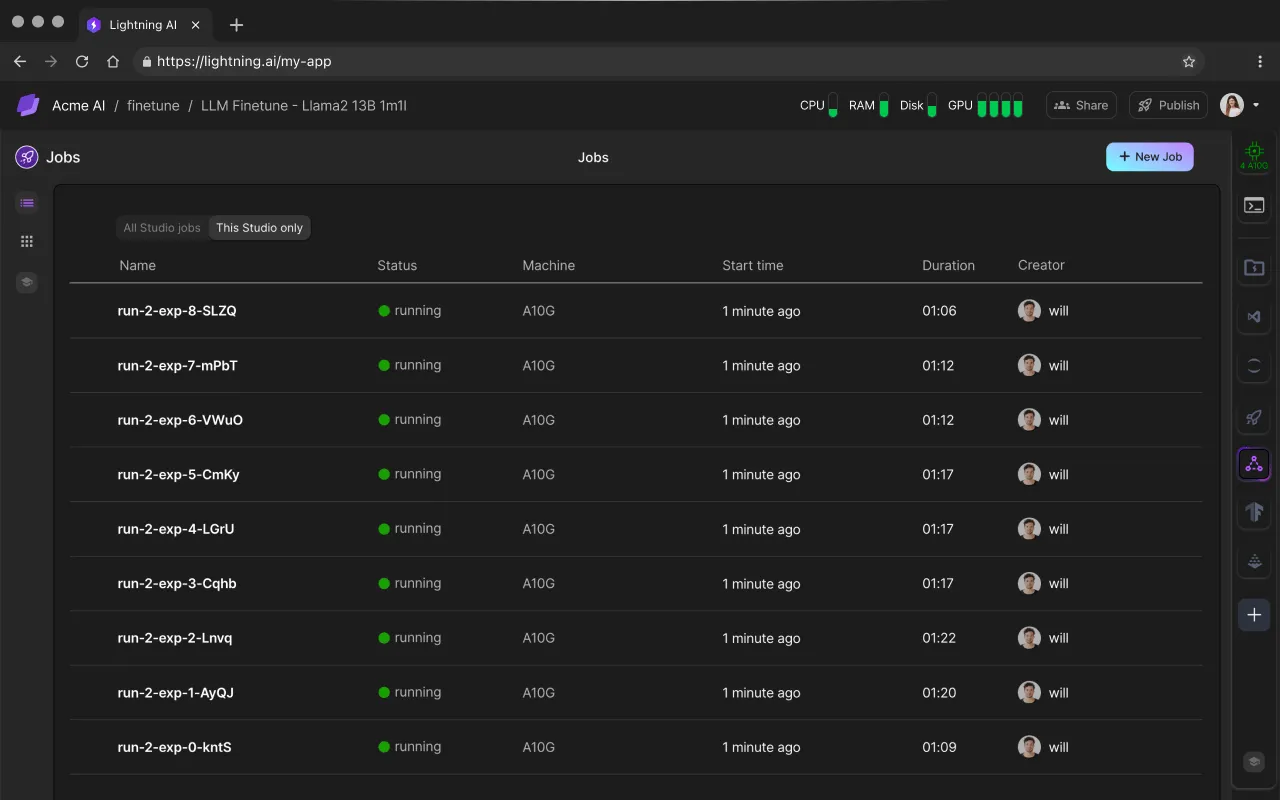
What is a Batch Job
A Batch Job is a non-interactive, parallel execution of code designed for scalability and reliability. Jobs can run in a Studio environment or with a Docker image.

Why Lightning Jobs?
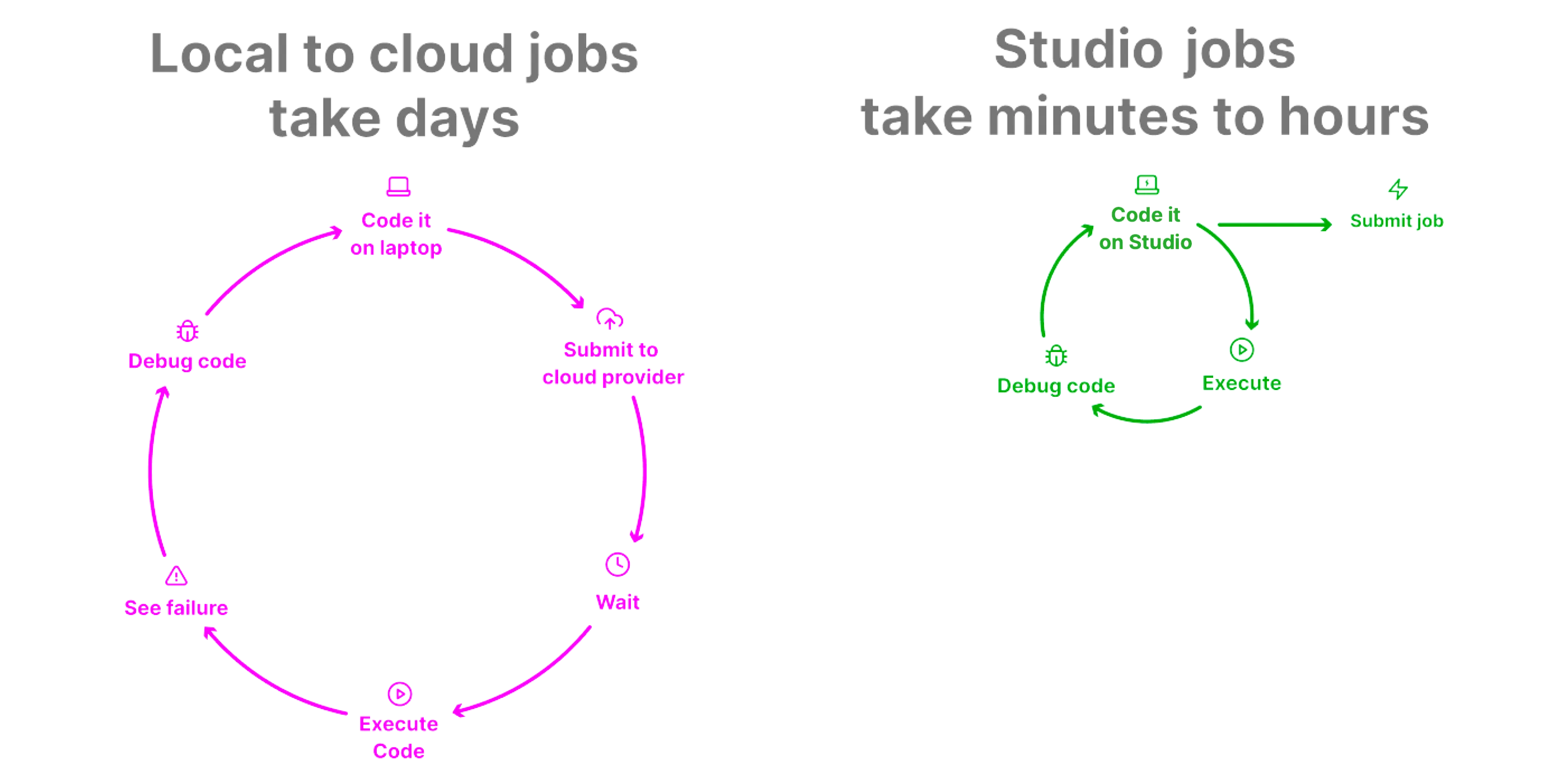
Traditional workflows require coding on a local machine, submitting a job via CLI, and troubleshooting in a disconnected environment. With Lightning Jobs, you develop and debug directly in Studio - your development and production environments are the same.
This approach drastically reduces iteration time, minimizes failures, and accelerates ideation. Fast iteration is the key to successful AI deployment, and Lightning AI is the only platform that makes this seamless.
This means you can setup the Studio exactly how you want it quickly and know when you submit a job that it won't fail. Developers waste days of iteration with traditional job submit systems because they have to fix, submit, wait, fail, and repeat.
Why do you need Jobs?
While Studios are ideal for interactive development, Batch Jobs are for automating, scheduling, and scaling production workloads.
Ideal workflow
Set up environment
Prepare the Job environment by configuring everything a job needs to run successfully. This includes:
- Installing Dependencies: Ensure all required libraries, frameworks, and tools are available.
- Downloading Data and Checkpoints: Bring in datasets and pre-trained model weights so they’re ready for execution.
- Building Packages: Package your custom code or tools for seamless integration.
- Setting Environment Variables: Define runtime variables to control job behavior.
Whether you use Studio or Docker, Lightning AI ensures that the environment is fully prepared and replicable for smooth job execution.
Iterate live
Refine and debug your code interactively in the Studio to ensure it runs smoothly and avoids crashes when executed as a Job. This phase is where you validate your setup and optimize for reliability:
- Ensure Code Stability: Debug and test your code in Studio to catch potential runtime errors before submitting as a Job.
- Monitor System Resources: Use Studio’s tools to track GPU utilization, VRAM usage, and CPU performance, ensuring your code fits within hardware limits.
- Optimize Configurations: Experiment with batch sizes, learning rates, and model parameters to find the optimal setup without risking job failures.
- Validate Dependencies: Confirm all required libraries, frameworks, and custom packages are installed and functioning correctly.
- Simulate Job runs: Run the code in Studio as if it were a Job, verifying the environment and data pipeline to catch any issues upfront.
The goal is simple: fail fast in Studio, where debugging is easy, so your submitted Job is guaranteed to run successfully without crashes or wasted time.
Submit Job
Once you’ve verified and fine-tuned your code in Studio, submitting the job is straightforward.
A job requires an environment (data, code, dependencies, etc...), there are two ways to get an environment:
- B) Use a Docker Image
- A) Submit the Studio as an environment (no Docker needed)
When you submit the Studio as an environment, Lightning AI handles the heavy lifting by creating a snapshot of your entire environment, ensuring consistency and reducing the risk of failures (think about it like an automatic Docker image).
Here’s what the snapshot includes:
Code: The exact version of your scripts or application files used in Studio, so there’s no risk of mismatch or errors from code changes.
Data: All datasets, checkpoints, and other input files are bundled, ensuring they’re available to the job without additional setup.
Dependencies: Every library, package, or framework you installed is captured in the snapshot, guaranteeing your job runs in the same environment you developed in.
Environment Variables: All runtime variables are preserved, allowing your job to behave exactly as it did during testing in Studio.
Eliminates Configuration Drift: Unlike traditional workflows, where discrepancies between development and production environments can cause failures, Lightning AI ensures your job runs in the exact same setup you tested.
Speeds Up Cold Starts: With everything pre-bundled, jobs spin up quickly without needing to re-download dependencies or data.
Guarantees Reliability: By submitting a fully tested and snapshot environment, you avoid the costly cycle of failed jobs and repeated debugging.
This approach ensures that what you debug in Studio is exactly what runs in production - no surprises, no inconsistencies, just reliable execution.
Key benefits
Blazing cold start
Jobs are ready to run instantly with pre-bundled code, data, and dependencies. Unlike competing platforms, Lightning AI avoids delays from post-start downloads, ensuring faster execution.
Reliable execution
By snapshotting the fully tested Studio environment, you eliminate the "submit-wait-fail-repeat" cycle and ensure your job runs exactly as expected.
Fast iteration
Iterate and debug in Studio, where you can catch and resolve issues before submission. Once submitted, jobs are guaranteed to work, and outputs are immediately accessible in Studio for seamless analysis.
Once the job produces its outputs (artifacts), easily analyze them in a studio. This removes the need of hoping between different tools and buying multiple different subscriptions.
Pay-as-you-go pricing
Pay only for the compute time you use, billed by the second. Job outputs are stored in your Teamspace drive,
How do Jobs compare to X?
With Lightning Jobs, your development and execution environments are identical, reducing iteration cycles from days to minutes. Our unique approach integrates debugging and production seamlessly, empowering rapid experimentation and scaling.
No other platform offers the same level of speed and reliability for batch workflows.
Was this page helpful?
Thanks for the feedback.