
Agents
Build an agent
Lightning AI Studio is perfect for building agents. Here's an example that shows you how to build and automate an agent that scrapes a website for you and tells you about which stocks to buy or not.
To follow along, start a new studio, and click on the "web scraper" example in the AI copilot.
Agent overview
This agent is fairly simple. It scrapes a website and tells you insights about these stocks
import requests
from bs4 import BeautifulSoup
import pandas as pd
from litai import LLM

llm = LLM('openai/gpt-4o')

def scrape_yahoo_finance_gainers(url):
    # these headers make our request look like a regular browser visit,
    # which helps prevent websites from blocking our scraper.
    headers = {
        'User-Agent': 'Mozilla/5.0 (Windows NT 10.0; Win64; x64) AppleWebKit/537.36 (KHTML, like Gecko) Chrome/125.0.6422.112 Safari/537.36',
        'Accept': 'text/html,application/xhtml+xml,application/xml;q=0.9,image/webp,image/apng,*/*;q=0.8',
        'Accept-Language': 'en-US,en;q=0.9',
        'Accept-Encoding': 'gzip, deflate, br',
        'Connection': 'keep-alive',
        'Referer': 'https://www.google.com'
    }

    # we send a request to the yahoo finance page to get its content.
    response = requests.get(url, headers=headers)
    # this line checks if the website responded successfully; if not, it'll tell us there was an issue.
    response.raise_for_status()

    # beautifulsoup helps us parse the html content so we can easily find specific elements like tables.
    soup = BeautifulSoup(response.text, 'html.parser')

    # we're looking for the main table that contains the stock data.
    table = soup.find('table')

    if not table:
        print("error: could not find table on the page.")
        return pd.DataFrame()

    # we extract the column headers from the table.
    headers = [header.text.strip() for header in table.find_all('th')]
    data = []

    # then we go through each row (skipping the header) and pull out the data for each stock.
    for row in table.find_all('tr')[1:]:
        cols = row.find_all('td')
        cols = [ele.text.strip() for ele in cols]
        data.append(cols)

    # finally, we put all this data into a pandas dataframe, making it structured and easy to work with.
    df = pd.DataFrame(data, columns=headers)

    # now for the fun part: using the llm!
    # we convert our dataframe to a csv string so the llm can easily understand the tabular data.
    csv_string = df.to_csv(index=False)

    # this is the prompt we send to the llm. we're asking it to act like a finance expert
    # and explain its choices simply, avoiding confusing jargon.
    question_prompt = """
    pick the top 2 stocks that had the most real movement today — based on strong price gain and healthy volume trends.
    ignore stocks where the percent gain is big just because the price is tiny, or where today's volume is way higher than usual (a one-day spike).
    explain clearly why each one looks like it has real investor momentum to a non investment expert.
    """

    # here's where litai sends your data and question to the llm and gets back an answer.
    # it's like having a very smart, on-demand analyst!
    answer = llm.chat(f'{question_prompt} here is the data: <data>{csv_string}</data>')
    print(answer)
    return df

if __name__ == "__main__":
    url = "https://finance.yahoo.com/markets/stocks/gainers"
    print(f"scraping data from: {url}")
    stock_data_df = scrape_yahoo_finance_gainers(url)

    if not stock_data_df.empty:
        output_filename = "yahoo_finance_gainers.csv"
        # we also save the raw scraped data to a csv file just in case you want to look at it yourself later.
        stock_data_df.to_csv(output_filename, index=False)
        print(f"data successfully saved to {output_filename}")
    else:
        print("no data to save.")
The scraper
The scraper is the portion of the code that loads a website's html code and extracts whatever is relevant.
import requests
from bs4 import BeautifulSoup
import pandas as pd
from litai import LLM

llm = LLM('openai/gpt-4o')

def scrape_yahoo_finance_gainers(url):
    # these headers make our request look like a regular browser visit,
    # which helps prevent websites from blocking our scraper.
    headers = {
        'User-Agent': 'Mozilla/5.0 (Windows NT 10.0; Win64; x64) AppleWebKit/537.36 (KHTML, like Gecko) Chrome/125.0.6422.112 Safari/537.36',
        'Accept': 'text/html,application/xhtml+xml,application/xml;q=0.9,image/webp,image/apng,*/*;q=0.8',
        'Accept-Language': 'en-US,en;q=0.9',
        'Accept-Encoding': 'gzip, deflate, br',
        'Connection': 'keep-alive',
        'Referer': 'https://www.google.com'
    }

    # we send a request to the yahoo finance page to get its content.
    response = requests.get(url, headers=headers)
    # this line checks if the website responded successfully; if not, it'll tell us there was an issue.
    response.raise_for_status()

    # beautifulsoup helps us parse the html content so we can easily find specific elements like tables.
    soup = BeautifulSoup(response.text, 'html.parser')

    # we're looking for the main table that contains the stock data.
    table = soup.find('table')

    if not table:
        print("error: could not find table on the page.")
        return pd.DataFrame()

    # we extract the column headers from the table.
    headers = [header.text.strip() for header in table.find_all('th')]
    data = []

    # then we go through each row (skipping the header) and pull out the data for each stock.
    for row in table.find_all('tr')[1:]:
        cols = row.find_all('td')
        cols = [ele.text.strip() for ele in cols]
        data.append(cols)

    # finally, we put all this data into a pandas dataframe, making it structured and easy to work with.
    df = pd.DataFrame(data, columns=headers)

    # now for the fun part: using the llm!
    # we convert our dataframe to a csv string so the llm can easily understand the tabular data.
    csv_string = df.to_csv(index=False)

    # this is the prompt we send to the llm. we're asking it to act like a finance expert
    # and explain its choices simply, avoiding confusing jargon.
    # ...
The model
Here we send the text and our question (ie: prompt) to chat GPT programmatically to answer the question based on the text.
import requests
from bs4 import BeautifulSoup
import pandas as pd
from litai import LLM

llm = LLM('openai/gpt-4o')

def scrape_yahoo_finance_gainers(url):
    # ...
    question_prompt = """
    pick the top 2 stocks that had the most real movement today — based on strong price gain and healthy volume trends.
    ignore stocks where the percent gain is big just because the price is tiny, or where today's volume is way higher than usual (a one-day spike).
    explain clearly why each one looks like it has real investor momentum to a non investment expert.
    """
    # here's where litai sends your data and question to the llm and gets back an answer.
    # it's like having a very smart, on-demand analyst!
    answer = llm.chat(f'{question_prompt} here is the data: <data>{csv_string}</data>')
    print(answer)
    return df
# ...
Automate the agent
"Deploy" means we make this program somehow run on its own without manual intervention. On Lighting there are various ways of deploying... but scheduling is the simplest way.
Hit the "deploy" button top right, choose the frequency of when this should run and type the command that will be used to run. If you don't know the command, ask the AI copilot to write it for you.
For example, here we will run this agent every monday, wed, friday.
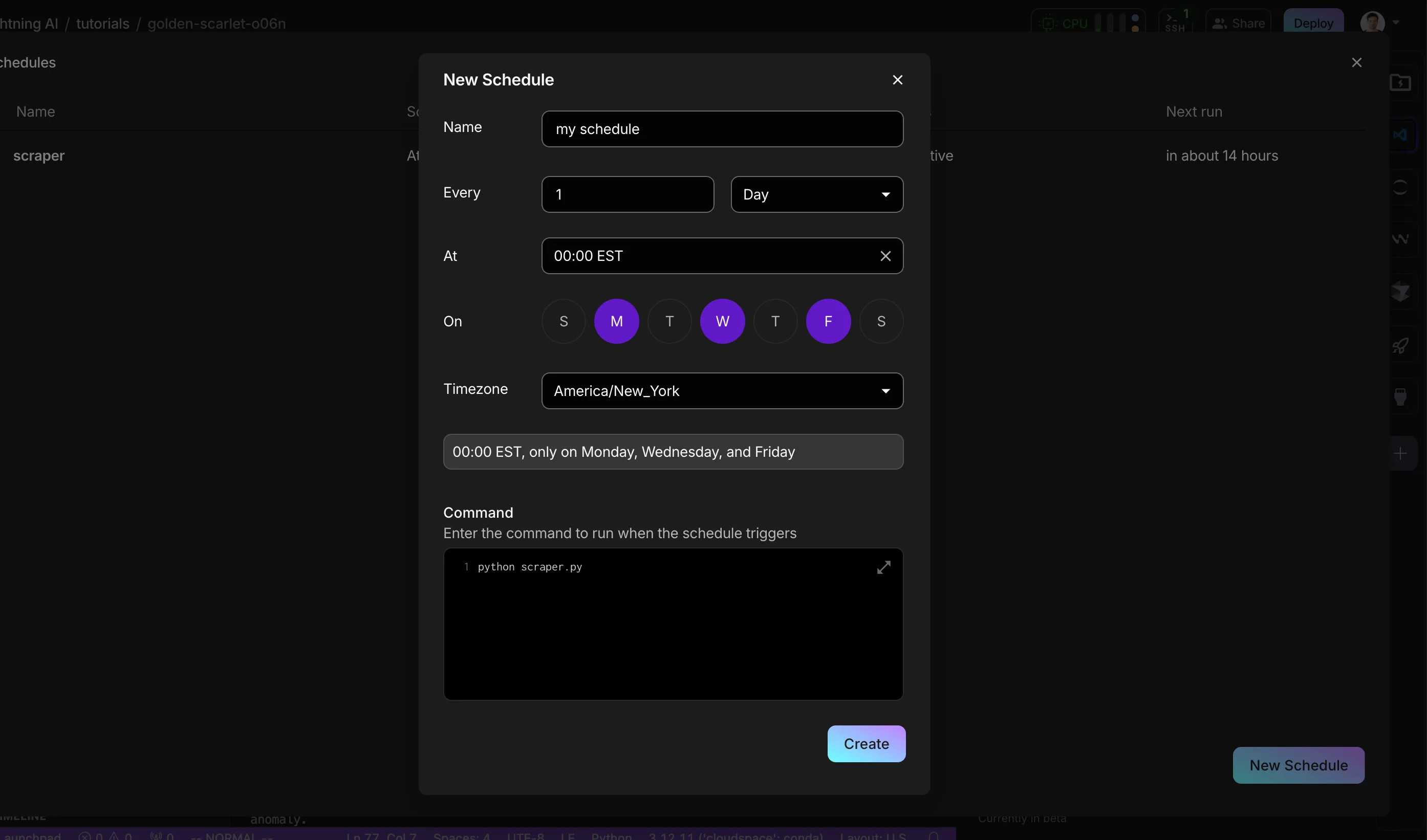
Now you can turn off the Studio! It will auto-start on those days, run the agent and shut down.
Agent frameworks
If you can use it in your laptop, you can use it in the Studio. Feel free to install LangChain, etc... We use LitAI which is minimal and can do most things agent frameworks can do without too much engineering.
Regardless of what you use, you can build it, host it and automate it on a Lightning Studio.
Was this page helpful?
Thanks for the feedback.