
Challenges of running ComfyUI
If you’re using ComfyUI to generate images or video for client work, you probably don’t want to spend your time setting up CUDA versions, drivers, or GPU provisioning.
You just want it to work.
For many marketing agencies and creative teams, ComfyUI starts as an exciting new capability and quickly turns into a dependency, requiring significant time investment and technical knowledge. It runs on one person’s machine. It slows down when projects get bigger. It becomes hard to share, hard to scale, and harder to rely on for real client deadlines.
Lightning AI lets you run ComfyUI in the cloud for free, no subscription required.
Not a stripped-down demo. Not a short trial. You get up to 80 GPU hours to start. That’s enough for roughly 2,000 images or up to 20 minutes of generated video. You can explore, test, build client proofs of concept, and even ship work before paying anything.
When you do need more, you pay only for what you use. No long-term contracts. No forced upgrades. Just usage-based scaling that matches how agencies actually operate.
Run ComfyUI without installation or setup
Running ComfyUI locally often means managing installations, troubleshooting environment issues, and hoping everyone on the team has compatible hardware.
On Lightning, you click once and ComfyUI launches in the cloud. It runs in your browser. There’s nothing to install and nothing to configure.
That means a designer can start generating immediately. A creative director can review outputs live. A developer can step in when customization is needed. No one is blocked by infrastructure.
Every ComfyUI environment can be shared with the rest of the team with one click.
Prototype visually. Customize with code. All in one place.
ComfyUI’s node-based interface is powerful because it makes complex generation visual. But as projects grow, teams often need more control.
Lightning brings ComfyUI’s visual interface and a full coding environment into one workspace. Switch between them instantly with a single click.
Prototype visually. Customize in Python. Go back to nodes. Everything lives together.
Creative teams don’t have to choose between no-code flexibility and developer-level control. They get both.
Collaborative ComfyUI workspaces for agencies and teams
Creative work is rarely a solo activity. Assets need to be shared. Workflows need to be versioned. Developers and creatives need to collaborate without stepping on each other.
Lightning includes live multiplayer and a shared drive by default. Teams can work in the same environment at the same time. Files are centralized. Outputs are accessible. There’s no sending large folders back and forth or wondering which workflow version is current.
Because everything runs in the cloud, your storage is persistent and cloud-agnostic. Your assets aren’t tied to a single machine or locked into a rigid setup. They stay available as your projects evolve.
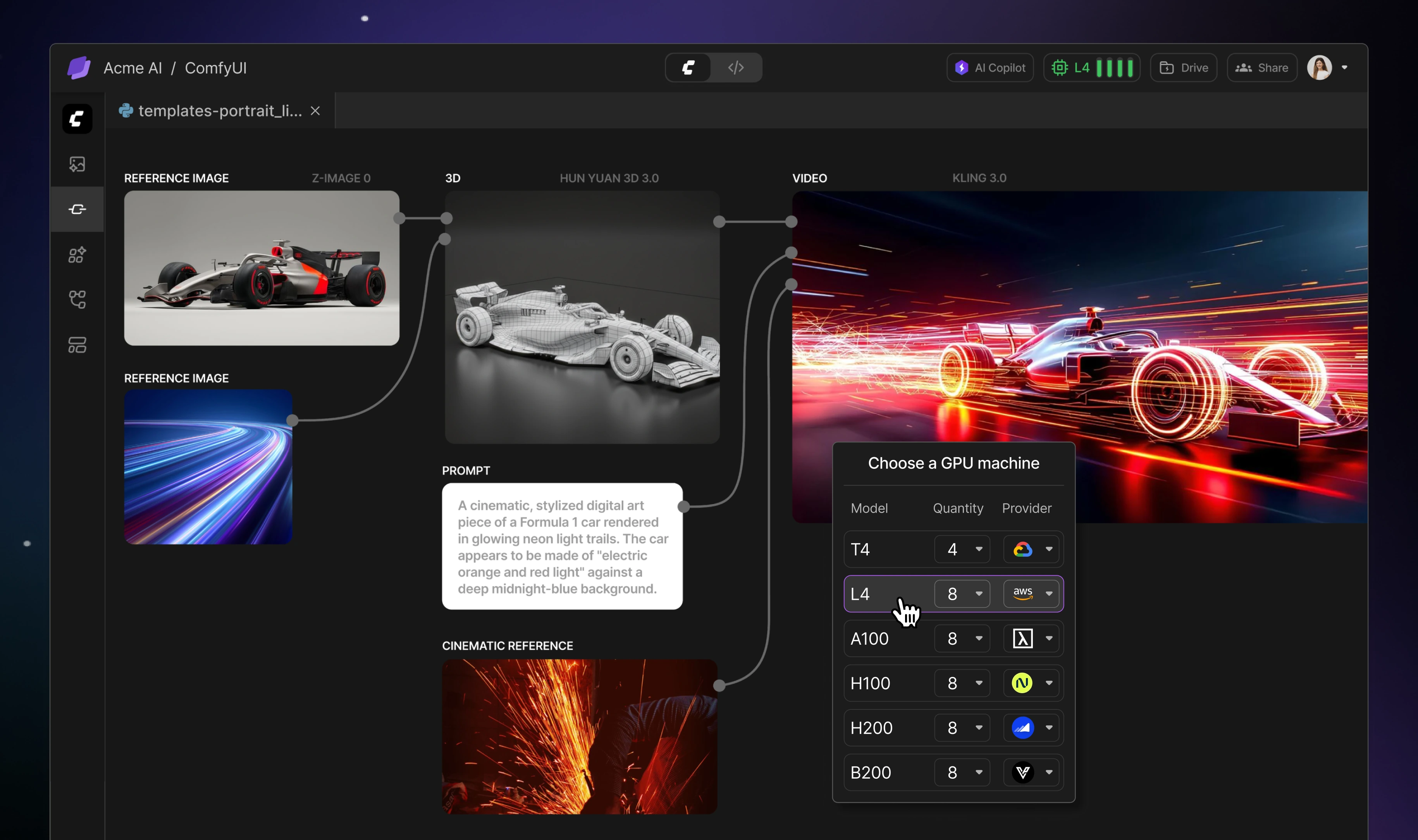
Choose the best GPU for ComfyUI (T4, L4, H100, H200)
Not every project needs the same level of compute.
When you’re experimenting, you might want a cost-efficient GPU. When you’re rendering final assets for a campaign, you might need significantly more power.
On Lightning, you can choose your GPU at any time — from T4 and L4 to high-performance options like H100 and H200. You can start small, switch when you need more performance, and continue working without rebuilding your environment.
That flexibility is critical for agencies managing shifting client demands and tight timelines.
Take ComfyUI from experiment to client-ready production
ComfyUI has become a core creative tool for many teams. But for it to move beyond experimentation and into production workflows, it needs reliable infrastructure, collaboration, and scalability behind it.
Lightning provides that foundation without adding complexity.
Start for free. Launch ComfyUI in one click. Collaborate in real time. Scale GPU power when your rendering demands increase.
You don’t need to become an infrastructure team to deliver AI-powered creative work.
You just need a platform that gets out of the way.
Try ComfyUI in the cloud.
Everything you need to know about ComfyUI on Lightning
Can I run ComfyUI in the cloud for free?
Yes. On Lightning AI, you can start with up to 80 free GPU hours. That’s enough for thousands of generated images or extended video experimentation. There’s no subscription required to get started. You only pay when you exceed the free usage or choose to scale.
Do I need to install anything to use ComfyUI on Lightning?
No installation is required. ComfyUI launches in your browser with one click. You don’t need to manage drivers, CUDA versions, Docker containers, or local GPU compatibility. Everything runs in the cloud.
Is ComfyUI better locally or in the cloud?
Running ComfyUI locally works for solo experimentation, but it limits collaboration and performance to one machine. Running ComfyUI in the cloud allows you to access more powerful GPUs, collaborate with your team in real time, and keep your files stored securely without depending on a single laptop.
For agencies and teams working on client deadlines, cloud environments are typically more reliable and scalable.
What GPU do I need for ComfyUI?
The right GPU depends on what you’re generating. For lightweight image prototyping, cost-efficient GPUs like T4 or L4 are often sufficient. For large workflows, high-resolution outputs, or video rendering, more powerful GPUs like H100 or H200 can significantly reduce rendering time.
On Lightning, you can switch GPUs at any time without rebuilding your environment.
Can multiple people use the same ComfyUI workspace?
Yes. Lightning supports live multiplayer workspaces and shared storage. Designers, developers, and creative leads can work in the same ComfyUI environment simultaneously. Files remain persistent in the cloud, so nothing is tied to one person’s machine.
Do I need coding experience to use ComfyUI on Lightning?
No. If you’re comfortable using ComfyUI’s visual node interface, you can work entirely without code. If your team wants to customize pipelines or extend functionality, a full coding environment is available in the same workspace. You can switch between visual workflows and code at any time.
Is there a monthly subscription required?
No subscription is required to start. You begin with free GPU usage and then pay only for what you use. This makes it easier for agencies to experiment, run client projects, and scale usage without committing.
Read more blogs and case studies
• Building Reliable Agent Systems with NVIDIA Nemotron 3 Super on Lightning
• Vibe Coding My Way to a Boltz-2 Structure Prediction App
• View all