

Introduction to LitLogger
With Neptune shutting down, many ML teams are facing the same question: "Where do we move our experiment tracking without rewriting our code or losing history?"
Lightning AI offers a straightforward answer for experiment tracking: LitLogger, a free, built-in experiment manager that works seamlessly with Lightning and any Python workflow.
Lightning AI is a unified platform for ML development: it handles training, experiment tracking, and production deployment in one environment. This means your code, metrics, artifacts, and models all live together, making workflows more reproducible, auditable, and shareable.
Experiment tracking in Lightning AI
ML teams often end up hitting the same problem, experiment tracking is separate from training, evaluation, and deployment.
Lightning consolidates these workflows into a single environment. With LitLogger built in:
- Experiments are logged directly where the model runs
- Metrics, metadata, and artifacts are stored alongside training and inference workloads
- No separate services to provision, integrate, or maintain
- Access control, sharing, and persistence are native to the platform
For teams migrating from Neptune, this means less overhead, fewer moving parts, and a reproducible workflow from experimentation to production.
Works with your existing stack
LitLogger is intentionally lightweight and flexible. You can integrate it into any Python code, PyTorch training loop, PyTorch Lightning project, or production API with minimal changes.
PyTorch Lightning example
from lightning import Trainer
from lightning.pytorch.demos.boring_classes import BoringDataModule, BoringModel
from litlogger import LightningLogger

class LoggingBoringModel(BoringModel):

    def training_step(self, batch, batch_idx):
        out = super().training_step(batch, batch_idx)
        self.log("train_loss", out["loss"])
        return out

    def validation_step(self, batch, batch_idx):
        out = super().validation_step(batch, batch_idx)
        self.log("val_loss", out["x"])
        return out

trainer = Trainer(max_epochs=10, logger=LightningLogger(), log_every_n_steps=10)
trainer.fit(LoggingBoringModel(), BoringDataModule())
See more examples for Python, PyTorch, and LitServe here.
Viewing and sharing experiments
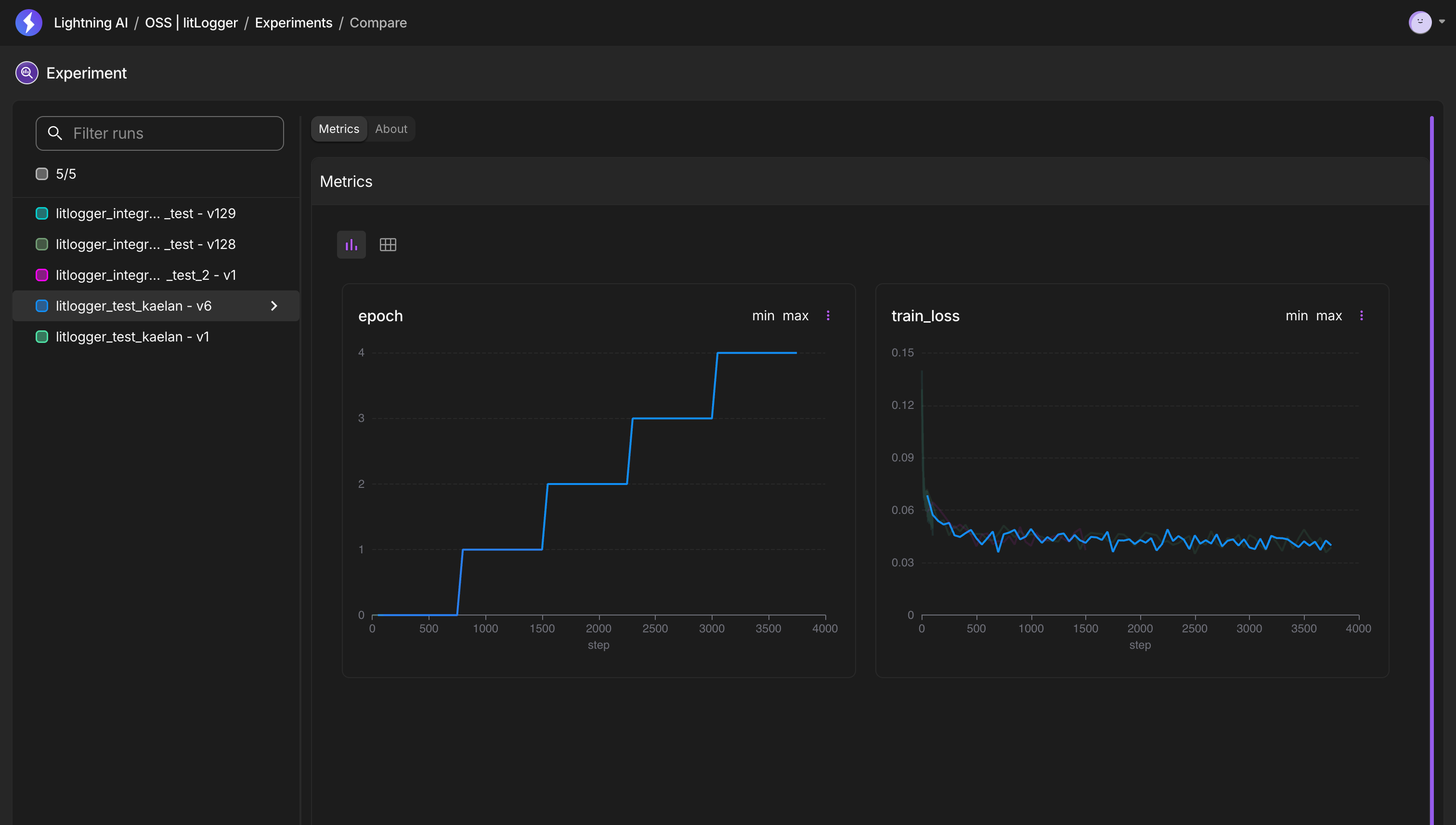
All experiments are automatically collected in the Experiments tab inside your Lightning Teamspace. Teams can:
- Inspect metrics and metadata
- Compare runs side by side
- Restore previous experiments
- Share results with specific users or collaborators
Migrating your existing Neptune data
Before you start
- Export your data from Neptune using the Neptune Exporter tool. Start from the migration overview.
- Get your Lightning AI credentials:
- use
lightning loginfor authentication, or - set the
--litlogger-user-idand--litlogger-api-keyflags
- use
Validate your export
Before loading the data with LitLogger, inspect what was exported:
uv run neptune-exporter summary --data-path ./exports/data
This command returns the number of exported projects or runs, attribute types, and the basic step statistics.
Load the data with LitLogger
The following command creates one Lightning AI teamspace per Neptune project:
uv run lightning login && \
uv run neptune-exporter load \
  --loader litlogger \
  --data-path ./exports/data \
  --files-path ./exports/files
If the owner (organization) is different from the current authenticated user, you can specify the owner with the --litlogger-owner
uv run neptune-exporter load \
  --loader litlogger \
  --litlogger-owner my-org \
  --data-path ./exports/data \
  --files-path ./exports/files
See LitLogger in action
https://pl-bolts-doc-images.s3.us-east-2.amazonaws.com/Docs_Studios_MP4/LitLogger-Demo.mp4
Get help migrating or learn more
If you’d like help migrating your Neptune data, setting up LitLogger, or understanding how Lightning fits into your workflow, contact sales at sales@lightning.ai
Read more blogs and case studies
• Why we merged Lightning AI and Voltage Park to build an AI-native cloud
• Build faster with Lightning: a developer-first GPU marketplace
• View all