
This article explains what the term means, why it matters for your code today, and ends with a hands-on tutorial to build your first harnessed agent with Lightning AI.
The Problem: Why Raw LLM Calls Aren't Enough
You've probably built something like this before:
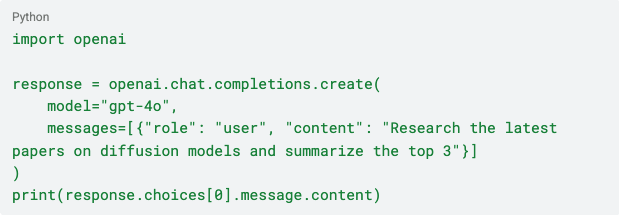
It works in a notebook or demo environment but falls apart when shipped. The model may have lost track of what it was doing after a dozen steps. It may have called the wrong tool at step 47 or burned through context.
Whatever the reason, it failed slowly, silently and at spectacular cost. Once you see a $0.40 task cost $40, the investigation and mitigation efforts begin:
- Error handling
- Retry logic
- State management
- A planning mechanism
Suddenly, this simple agent is now a complex interlink of disparate supports.
What you have built is a harness.
What Is an Agent Harness?
An agent harness is the infrastructure wrapping around an AI model so it works reliably in production:
- Code
- Configurations
- Execution logic
- System prompts
- Tool execution logic
- Context compression
- Memory management
- Retry handlers
- Observability hooks
- State persistence
- Sub-agent coordination
This all lives in the agent harness.
The clearest AI agent harness formula in 2026 so far comes from LangChain: Agent = Model + Harness.
A useful analogy: if the LLM is a CPU, and the context window is RAM, then the harness is the operating system. It decides what enters RAM, when to flush it, what tools are available, and how to recover when something crashes.
Harness vs. Framework: What's the Difference?
We’re seeing these terms used interchangeably but they are different:
An agent framework gives you building blocks. LangChain, LlamaIndex, and CrewAI are frameworks. They provide abstractions for tool calling, memory interfaces, and retrieval, but are largely neutral about how your agent actually runs.
An agent harness is the runtime layer on top. A batteries-included environment guides how your agent runs end-to-end.
It controls what context the model sees at each step.
It defines how the system handles failures and decides when to spawn sub-agents.
It also compresses a 200-step context into something coherent. Claude Code, Manus, and LangChain's Deep Agents product are all harnesses.
Simplified: You use a framework to compose the agent's capabilities and a harness to run it reliably.
Why Harness Engineering Is a Defining AI Skill
Models Are Converging. Harnesses Are Diverging.
The performance gap between frontier models is narrowing faster than expected. Claude Opus, GPT-5, and Gemini 2.5 are comparable for most tasks. The delta between them is often smaller than the delta introduced by harness quality.
LangChain's own Terminal Bench 2.0 leaderboard revealed something striking: the same model running in an optimized third-party harness jumped from outside the top 30 to the top 5. The harness changed, not the model weights.
This central insight drives the current debate: people treat models as commodities, and they build and test performance and differentiation in harnesses.
The "100th Tool Call" Problem
Agents fail in production not because they're unintelligent, but because they lose coherence over time. A model might flawlessly complete step 1 through step 30. But by step 100, the context window has accumulated tool outputs, intermediate reasoning, error messages, and redundant observations.
The model starts contradicting itself. It forgets the original task and loops.
The harness solves this. Good harnesses implement context compression by summarizing past steps, evicting stale information, and ensuring the model always sees the right information at the right time. They maintain filesystem-based state so agents can "write things down" and refer back to them across context windows. They coordinate sub-agents, each with isolated contexts, to prevent interference on parallel tasks.
The Debate: Fat Harness vs. Thin Harness
Not everyone agrees on how much harness is right because architecture decisions influencing performance also depend on the use case.
LangChain’s Harrison Chase champions the Fat Harness argument. He maintains that as models improve and tasks get longer, harnesses must become richer and more opinionated.
Built-in planning tools, sub-agent spawning, lifecycle hooks, and middleware aren't overhead. They make 200-step tasks possible. LangChain's Deep Agents product embodies this philosophy.
The Thin Harness argument is championed by YC's Garry Tan. He maintains that every line of logic you put in the harness takes reasoning away from the model.
In frontier models, heavy scaffolding can cap performance. The right approach is a minimal harness loop → context in → model reasons → tool executes → output. With domain knowledge encoded in rich skill docs rather than hardcoded orchestration, this keeps the harness thin and the skills fat.
The practical answer depends on task complexity and how long your agent needs to run. Short-horizon tasks under 20 steps lean thin. Long-horizon tasks such as research, coding across sessions, and multi-day workflows lean fat.
The Six Components of a Modern Agent Harness
Whether you're building fat or thin, every production AI harness needs these six things:
1. The Agent Loop. The core execution cycle: model receives context, reasons, calls tools or returns output, results feed back in. This is the heartbeat of any agent.
2. Context Management. What does the model see at each step? This includes context selection (pulling in relevant memories), context compression (summarizing past steps), and context isolation (keeping sub-agent outputs from polluting the main agent's working memory).
3. Tool Execution Layer. The harness manages how tools are defined, invoked, and how results are returned to the model. It enforces permissions, handles errors, and prevents tools from running in unsafe ways.
4. State and Memory. Persistent state across steps and sessions. Short-term state (within a run) is typically in-memory or filesystem-based. Long-term memory (across runs) requires a retrieval mechanism such as embeddings, a vector store, or structured memory files.
5. Human-in-the-Loop Controls. Production agents need approval gates for irreversible actions: deleting databases, sending emails, deploying code. The harness implements these pause points.
6. Observability. Traces are the source of truth for agent behavior. Without observability via logs and evaluation hooks, debugging a multi-step agent is nearly impossible. You can't know what the model saw at step 47, or why it made the decision it made at step 83.
Tutorial: Build Your First Agent Harness on Lightning AI
Now let's build a complete thin agent harness using Lightning AI's LitAI open-source, zero-magic agent framework.
What we're building: A research agent that can search the web, read URLs, and produce a structured summary with tool use, a planning loop, and basic context management. Runs in a Lightning AI Studio with free GPU hours.
Step 1: Set Up Your Environment
Open a Lightning AI Studio which includes some free GPU hours.
pip install litai requests duckduckgo-search litai handles the LLM routing, requests fetches web content, and duckduckgo-search gives your agent real-time search without a API key required.
Get your Lightning API key at lightning.ai for access to 20+ models including GPT-5 and Claude Opus.
Step 2: Define Your Tools
Tools are just Python functions decorated with @tool. The harness makes them available to the model; the model decides when to call them.
from litai import LLM, tool
import requests
import re
from duckduckgo_search import DDGS

@tool
def web_search(query: str, max_results: int = 5) -> str:
    """Search the web and return results."""
    results = []
    with DDGS() as ddgs:
        for i, r in enumerate(ddgs.text(query, max_results=max_results), 1):
            results.append(f"{i}. {r['title']}\n   {r['href']}\n   {r['body']}")
    return "\n\n".join(results) if results else "No results found."

@tool
def fetch_page(url: str) -> str:
    """Fetch the text content of a webpage."""
    try:
        response = requests.get(url, timeout=10)
        # Strip HTML tags for clean text
        text = re.sub(r'<[^>]+>', ' ', response.text)
        # Trim to avoid blowing out context
        return text[:3000] + "..." if len(text) > 3000 else text
    except Exception as e:
        return f"Error fetching page: {e}"
Step 3: Build the Agent Loop (The Harness)
Here's the core harness: a loop, a context manager, and tool routing.
def run_research_agent(topic: str, max_steps: int = 10) -> str:
    """
    A minimal research agent harness.

    Harness components implemented here:
    - Agent loop (while loop with step counter)
    - Context management (message history with compression)
    - Tool execution (auto_call_tools)
    - Observability (step logging)
    - Stopping condition (max_steps guard)
    """

    llm = LLM(model="openai/gpt-5-mini", api_key="<YOUR_LIGHTNING_API_KEY>")
    tools = [web_search, fetch_page]

    # --- HARNESS: System prompt = your "skill file" ---
    # This is where domain knowledge lives, not in the loop logic.
    system_prompt = """You are a research agent. Your job is to thoroughly research
    a given topic and produce a structured, accurate summary.

    Process:
    1. Start with a web search to get an overview.
    2. Identify the 2-3 most authoritative sources.
    3. Fetch and read those pages for deeper detail.
    4. Synthesize your findings into a clear summary.
    5. When you have enough information, output your final summary
       starting with "FINAL SUMMARY:" and stop calling tools.

    Be methodical. Search before you conclude. Cite your sources."""

    # --- HARNESS: Initialize message history (context window state) ---
    messages = [{"role": "system", "content": system_prompt}]
    messages.append({"role": "user", "content": f"Research this topic thoroughly: {topic}"})

    step = 0

    # --- HARNESS: The agent loop ---
    while step < max_steps:
        step += 1
        print(f"\n--- Step {step}/{max_steps} ---")

        # Model reasons and decides what to do
        response = llm.chat(
            messages=messages,
            tools=tools,
            auto_call_tools=False  # We control tool execution (thin harness choice)
        )

        print(f"Model output: {str(response)[:200]}...")

        # --- HARNESS: Stopping condition ---
        # If the model produced a final answer, we're done
        if isinstance(response, str) and "FINAL SUMMARY:" in response:
            print("\n✅ Agent reached final answer.")
            return response

        # --- HARNESS: Tool execution ---
        # If the model wants to call a tool, execute it and feed results back
        if hasattr(response, 'tool_calls') or not isinstance(response, str):
            tool_result = llm.call_tool(response, tools=tools)
            print(f"Tool result: {str(tool_result)[:200]}...")

            # Add both the model's tool call and the result to context
            messages.append({"role": "assistant", "content": str(response)})
            messages.append({"role": "tool", "content": str(tool_result)})
        else:
            # Plain text response — add to context and continue
            messages.append({"role": "assistant", "content": response})

        # --- HARNESS: Context compression (simple version) ---
        # If message history is getting long, compress older messages
        if len(messages) > 20:
            print("⚡ Compressing context...")
            # Keep system prompt + last 10 messages
            compression_prompt = f"Summarize these intermediate research steps concisely: {str(messages[1:-10])}"
            summary = llm.chat(compression_prompt)
            messages = [messages[0]]  # Keep system prompt
            messages.append({"role": "assistant", "content": f"[Previous research summary: {summary}]"})
            messages.extend(messages[-10:])  # Keep recent steps

    # --- HARNESS: Fallback if max steps reached ---
    print("\n⚠️ Max steps reached. Returning best available answer.")
    final_request = messages.copy()
    final_request.append({
        "role": "user",
        "content": "You've reached the step limit. Summarize everything you've found so far."
    })
    return llm.chat(messages=final_request)
Step 4: Run It
if __name__ == "__main__":
    result = run_research_agent(
        topic="Agent harness engineering: what it is and why it matters in 2026"
    )
    print("\n" + "="*60)
    print("RESEARCH COMPLETE")
    print("="*60)
    print(result)
Step 5: Launch in Lightning AI Studio
To run this in a Lightning AI Studio with zero setup:
- Go to lightning.ai and open a new Studio
- Paste the code above into a Python file
- Add your Lightning API key
- Run: python research_agent.py
Your agent will spin up instantly. No Docker. No CUDA setup. No infrastructure management.
What This Harness Implements (and What It Doesn't)
Implemented:
- Agent loop with step guardrail
- Tool definition and execution
- Context management with basic compression
- Stopping conditions (success and max-steps)
- Observability via step logging
What a production harness would add:
- Filesystem state persistence (so agents can resume across crashes)
- Sub-agent spawning for parallel research tasks
- Human approval gates for actions with side effects
- Structured trace logging (for debugging step 47)
- Eval hooks (to measure whether the output is actually good)
The thin harness above is a solid starting point. Layer in components as your task complexity grows.
The Harness Is the Product
The most important shift in AI engineering right now is the realization that the model is increasingly a replaceable component. Swapping from GPT-5 to Claude Opus inside a well-built harness should be a one-line change. The harness (your context management strategy, your tool design, your memory system, your eval framework) is where months of engineering judgment accumulates. That's where the moat lives.
As one practitioner put it: you can fine-tune a competitive model in weeks. Building a production-ready harness takes months. Companies that treat their harness as the product, and the model as a swappable part inside it, are the ones winning in 2026.
Lightning AI gives you the platform to build, iterate, and deploy that harness from a free Studio notebook to GPU clusters at scale.
No infrastructure overhead. No slowing down.
Related Resources
- LitAI Documentation
- LitAI on GitHub
- LangChain on context engineering