---
title: Audit logs
description: >-
The audit log records who did what in your organization, when, and from where.
Results are always scoped to your organization. Actions taken by Lightning AI
staff are recorded separately and don't appear here.
canonical: 'https://lightning.ai/docs/platform/cluster/audit-logs'
---
# Audit logs {#audit-logs}
The audit log records who did what in your organization, when, and from where. Results are always scoped to your organization. Actions taken by Lightning AI staff are recorded separately and don't appear here.
> **Required role: Administrator**
>
> Viewing and exporting audit logs needs the [Administrator role](/docs/platform/cluster/access/roles-permissions.md).
> **Rolling out by region**
>
> Audit logs are rolling out region by region, starting with **ORD1**. Other regions will follow. If you don't see **Audit log** in the console sidebar, it isn't enabled for your organization or region yet. [Contact support](/docs/platform/cluster/support.md) to request access.
| Need | Use |
|------|-----|
| Review recent activity | [Recent events](#recent-events): up to the 2000 newest events from the last 36 hours |
| Evidence for a SOC 2 or security review, or long-term retention | [90-day export](#90-day-export) |
## Recent events {#recent-events}
Returns up to the 2000 most recent events, newest first, from roughly the last 36 hours. There are no filter or pagination parameters. For activity older than that, or for a complete record, use the [90-day export](#90-day-export).
**Console**
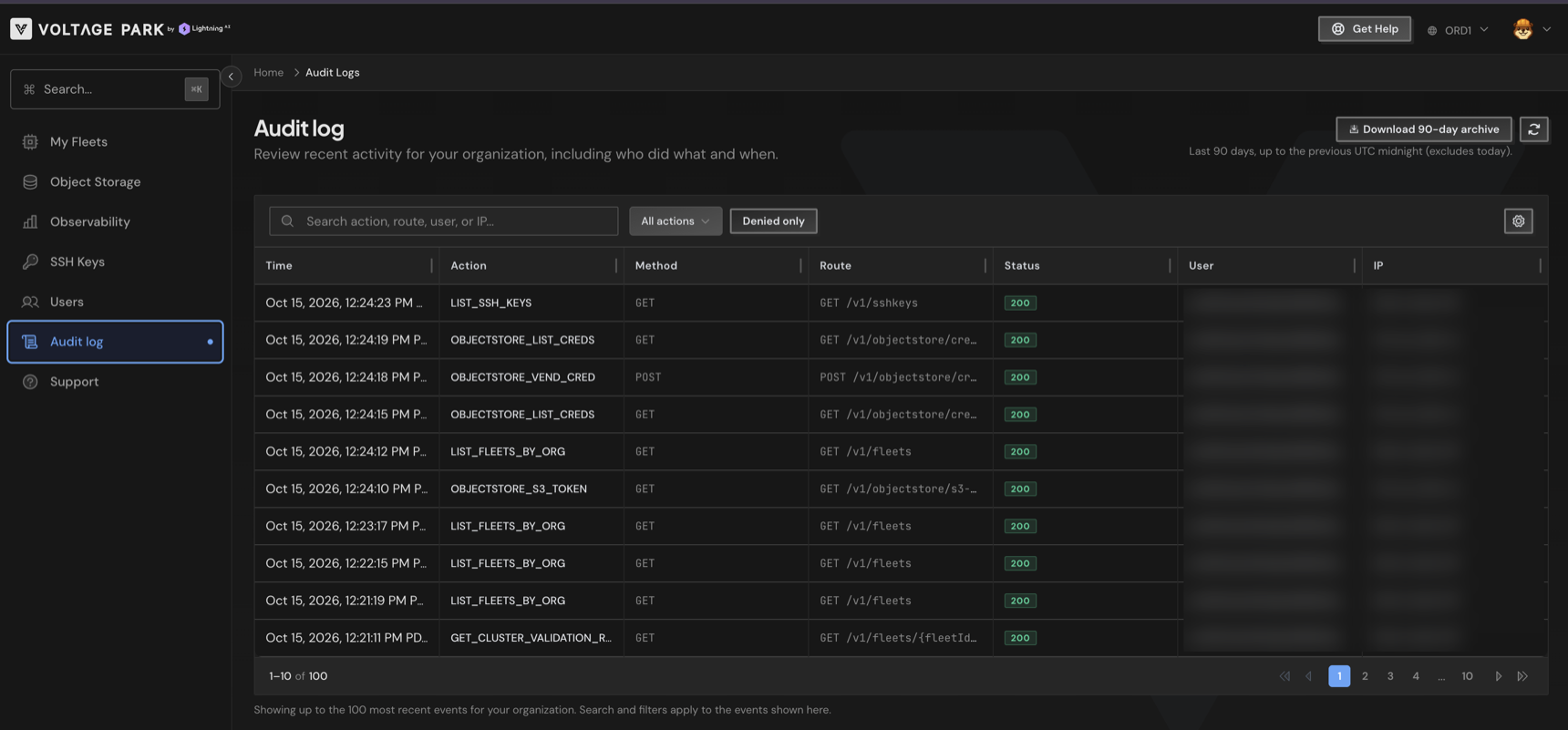
Select **Audit log** in the sidebar. Each event shows the time, action, method, route, response status, user, and source IP. Search by action, route, user, or IP, filter by action, or select **Denied only** to see requests that were refused. Search and filters apply to the events shown on the page, not to your full history.
 **API**
```bash
curl "$API_URL/v1/audit-logs" -H "Authorization: Bearer $TOKEN"
```
## 90-day export {#90-day-export}
The 90-day export is available in **ORD1** first, and other regions will follow. In a region where export isn't available yet, starting an export returns `500 Internal Server Error` and the console shows "Audit log export is not available in this region." Retrying won't help, so [contact support](/docs/platform/cluster/support.md) if you need an export from that region.
The export is a gzip-compressed NDJSON file (one JSON event per line) covering the **90 full days ending at the most recent UTC midnight**. The window is fixed, so everyone in your organization who requests it on the same UTC day gets the same archive, and at most one archive is built per day.
**Console**
Open **Audit log** and select **Download 90-day archive**. The download starts when the archive is ready.
**API**
```bash
# 1. Start the build (safe to call repeatedly)
curl -X POST "$API_URL/v1/audit-logs/export" -H "Authorization: Bearer $TOKEN"
# 2. Poll until status is "ready"
curl "$API_URL/v1/audit-logs/export" -H "Authorization: Bearer $TOKEN"
# 3. Download and read it
curl -o audit.ndjson.gz ""
gunzip -c audit.ndjson.gz | jq -c .
```
```json
{
"status": "ready",
"windowStart": "2026-07-17T00:00:00Z",
"windowEnd": "2026-10-15T00:00:00Z",
"format": "ndjson+gzip",
"url": "https://...",
"expiresAt": "2026-10-15T17:15:00Z"
}
```
| `status` | Meaning | What to do |
|----------|---------|------------|
| `notStarted` | No archive for today, and no build running. | Call `POST`. |
| `running` | A build is in progress. | Poll again in a few seconds. |
| `ready` | The archive is complete. | Download from `url` before `expiresAt`. |
| `failed` | The build didn't finish. `error` gives the reason. | Call `POST` again. |
- The first build of a UTC day usually takes under a minute, and longer for organizations with a lot of activity. Later calls that day return immediately.
- `url` is a short-lived presigned link. Download promptly, and poll `GET` again for a fresh link if it has expired.
---
**Navigation**
- Parent: [Cluster](/docs/platform/cluster.md)